
Cloudmorrow is a foundation. Everything a person uses on top of it — a task board, a CRM, a fleet log, the family calendar — is a Quill: a package in its own repository, found in the Quill Catalog, chosen when you install and added whenever you like after. The ones we write are Quills like anybody else's; they are simply the first in the catalog.
This page is the contract for a Quill: what one is, its manifest, its screens, jobs and code, and the catalog. The data it works on — datamodels, records, spaces, access — is the contract on DATAMODELS.md. Together they supersede the "app" and "element" wording in PLATFORM.md and DATA.md; where they differ, these pages win, and those remain the reasoning behind them.
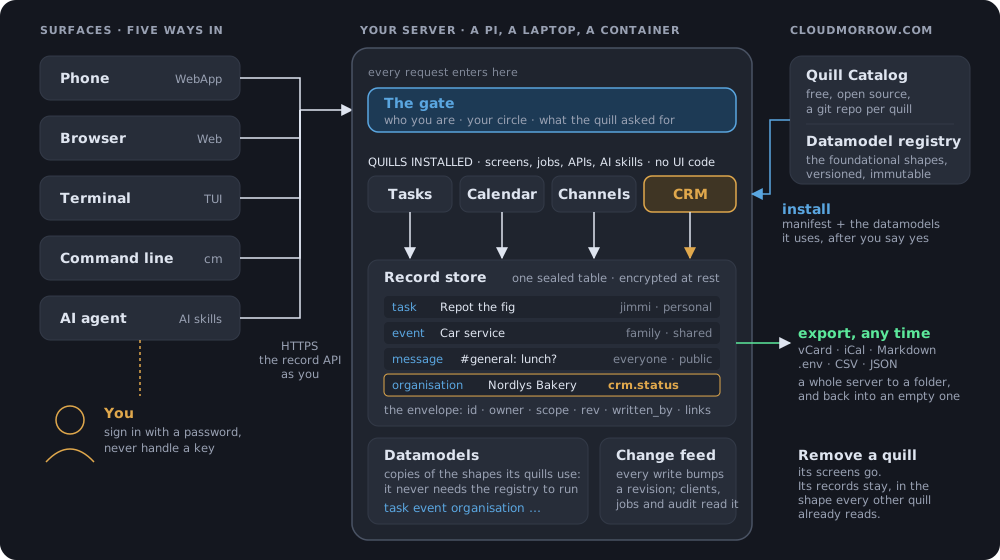
Five surfaces, one server, one gate, one store. Every surface draws a Quill from the same description, and a Quill reads and writes only the datamodels it asked for: the amber path is CRM's, to organisations and deals and nothing else. Remove a Quill and its screens go; its records stay, in the shape every other Quill already reads.
The words
| word | what it is |
|---|---|
| Core | This repository. Accounts, sealing, the record store, the gate, the Quill runtime, the kit renderers for every surface, the CLI, the MCP server. Nothing a person would call an app. |
| Quill | A software package: one repository with a quill.toml at its root, and a quill.py when it has code. It declares the data it uses, the screens it shows, what can be done in it, and the jobs, hooks, webhooks, APIs and services it runs. |
| Quill Catalog | Cloudmorrow/quill-catalog: one catalog.toml naming every published Quill, its repository, a pinned release and a category. Your server reads it; a pull request adds to it. |
| Category | Where a Quill is shelved: in the catalog, and in the web app's rail and the terminal app's sidebar, where its tab stands under the category's heading. Personal, Productivity, Home, Business, Developer, … in the catalog's order. |
| Datamodel | A kind of data with standard fields: task, contact, vehicle. Records belong to the person, never to a Quill. |
| Foundational datamodel | One of the standard datamodels in Cloudmorrow/datamodels, the ones Cloudmorrow decides on. Grouped into domains — Tasks, Customers (CRM), Fleet, Calendars, Messaging, Notes, Secrets, Files — which you can choose at install on their own, with or without a Quill that uses them. |
| Extended datamodel | What a Quill adds: fields of its own on a foundational datamodel (fleet.odometer on a vehicle), or a new datamodel under its own name (fleet.service_visit). Anybody's next Quill may use either. |
| Dataset | Records that come with a Quill — reference data (car makes, country codes) or a starting record (your first board) — and, later, a named collection of records a person makes and shares ("Fleet 2026"). |
| Kit | The fixed vocabulary of screens every surface can draw: list, board, detail, form, calendar, thread, grid, editor, sheet, document, data, timeline, and view — a screen a Quill's code draws from primitives. |
| Quill code | The Python a manifest names — views, actions, hooks, jobs, webhooks, APIs, machine handlers — run in a sandbox, through the gate. See QUILLCODE.md. |
| Shelf | What one person has: the server's Quills that are for them (everyone's, or an audience of circles and people), their own, and the ones shared with them. A personal Quill is one somebody installed for themselves; its key is ~owner.id. See SHARING.md. |
The rules
- A Quill never ships per-surface UI. Screens are kit elements, or views its code builds from primitives, so every Quill is on the phone, the full web app and the terminal automatically — and on the command line and to an assistant as tools. There is no escape hatch: no HTML, CSS, JavaScript or Textual in a Quill. When the kit or the primitives cannot say something, they grow, and every surface grows with them.
- Data is the person's. Uninstalling a Quill removes its screens and
its jobs, never a record. Its extension fields stay on the records, read-
only, until something else writes them or the person clears them, and the
records of a datamodel it introduced are there again the day it comes
back. The administrator removing it sees what it brought, with how many
records hold each, ticked to keep, and may untick what should go with
it — records and all (
DELETE /api/quills/{id}?drop=). - What a Quill adds is visible before it is added. The catalog page and the install sheet list its datamodels (used, extended, introduced), its datasets, its screens, its jobs, webhooks, APIs and services, and every grant it asks for. Nothing installs without a yes.
- Declarative first, then Python. A Quill with no code is the normal
case: the datamodels carry create, change, move, tick and delete; the kit
carries the screens; the core runs declared jobs. Code is for what cannot
be declared:
quill.py, run in a sandbox inside the server, through the gate (QUILLCODE.md). A service, outside it, is the last resort (see Webhooks, APIs and services). - One gate. Every read and write — by a person, a Quill's service, or an assistant — goes through the same check of principal, action, datamodel and scope. The person's circles are part of it: a Quill does what the data lets them do, drawn read-only where they may only read, without the screens over data they may not reach, and not at all when nothing is left (CIRCLES.md).
- Every Quill is its own repository. Ours live in the Cloudmorrow
organisation as
quill-<id>; anybody else's live wherever they like and join the catalog by pull request. - Anybody may have a Quill of their own, and it changes nothing other people see. A person installs one for themselves — from the catalog, a folder, or a conversation with their assistant — and it is on their shelf alone, over their own data, run as them; they may share it with people who say yes, an administrator may promote it for everyone, and it may be exported to be published. The administrator decides whether any of that is allowed (SHARING.md).
A Quill
quill-tasks/
  quill.toml          the manifest: everything below is declared here
  quill.py            optional: its code — views, actions, hooks, jobs (QUILLCODE.md)
  README.md           what it is, for the catalog page
  CLAUDE.md           how to work on it with an assistant (from the template)
  .claude/skills/     skills for that assistant (from the template)
  tests/              its tests, against the harness (`cm quill test`)
  pyproject.toml      for working on it: `uv sync` gets Cloudmorrow and pytest
  datasets/           optional: records to load, as TOML or CSV
  datamodels/         optional: datamodels this Quill introduces
  services/           optional: code for the services it runs
The manifest
The whole of Tasks:
[quill]
id = "tasks"                              # lowercase, unique in the catalog
name = "Tasks"
version = "1.0.0"
summary = "Boards with three lanes: To Do, Doing, Done."
category = "personal"
icon = "tasks"                            # one of the icon library's, or the app's own
publisher = "Cloudmorrow"
license = "AGPL-3.0-or-later"
features = [                              # what it does, for the catalog and the install sheet
  "Boards with three lanes: To Do, Doing, Done",
  "Subtasks as - [ ] lines in a task's Markdown",
  "Done empties itself a week after a task is finished",
]

[uses]
datamodels = ["board", "task"]            # foundational; installed with the Quill

[[screens]]
id = "board"
kit = "board"
label = "Tasks"
model = "task"
group = "board"                           # a link field: the chips across the top, titled with the linked model's label
lane = "lane"                             # an enum field: the columns
title = "title"
body = "body"
done = "done"                             # the lane the circle on a card moves to

[[jobs]]
id = "sweep-done"
action = "expire"                         # a core action, no code
model = "task"
field = "done_at"
after = "7d"
every = "1h"

[[datasets]]
id = "first-board"
model = "board"
seed = "per-owner"                        # once for each person who has none
records = [{ title = "{owner}'s tasks" }]
The tab's icon is a pixel mark from the icon library
(src/cloudmorrow/icons/, listed by theme at
cloudmorrow.com/resources/icons):
icon = "hedgehog" names one, and every surface draws it from the same
rows. The app's own nine (notes, tasks, files, secrets, settings,
chat, calendar, me, today) and the CRM's funnel may be named too.
A name the library does not have shows the quill mark, and cm quill check
says so. A screen names its own the same way (icon = "handshake" on a
[[screens]] table), for the item it is under the Quill's tab: give every
screen one, and no two of a Quill's items look alike. The library is CC0 — public domain, free to use anywhere — and the
web app reads all of it once from GET /icons.json; the package README says
how to add one.
The data
What a Quill declares in [uses], [[extends]], its datamodels/ folder
and [[datasets]] is the data contract, which has its own page:
DATAMODELS.md — the format of a datamodel and its field
kinds, what is indexed and what is sealed, versions, extension fields and
introduced datamodels, the record envelope and the record API, spaces, who
may see and change what, and the backends that keep notes, files and
secrets where they are. A manifest names datamodels; that page is what the
names mean.
Screens
Each screen names a kit element and binds it to fields. Every record a kit draws — a row, a card, a tile — opens the record's sheet, and has a menu (a right-click on a computer, a finger held on it on a phone) with Open and the actions on its datamodel, from whichever Quill declares them; a Quill declares the actions, never the menu (QUILLCODE.md, Actions, on every surface). The kit, and what each element needs:
| kit | binds | on the phone | on the full web app | in the terminal | on the command line |
|---|---|---|---|---|---|
list |
model, title, optional subtitle, tick (a bool field), fields (the sheet's), group and subgroup (a link, an enum or an indexed string: picked through) |
chips for the group and subgroup, a list with a circle per row | the same, wider | the groups down the left, the subgroup as buttons, a table | cm <quill> list [-g group/subgroup], add, done |
list of projects |
the same, and vault (a string field: the vault the project's secrets are in), optional repo (url) and env_files (json) |
the vault's environments on the sheet: each saved as its .env file, a .env file read in | the same | i init a folder, u update, c clone, m import its .env files |
cm <quill> init [--path], update, clone, secrets [import|export] |
board |
model, lane (an enum, or a link: see below), title, optional group (link), subtitle (a field or a list of them), body, done |
lanes stacked | lanes as columns, drag and drop | lanes as columns, drag and keys | cm <quill> list, add, move |
detail / form |
model, fields |
a sheet | a panel | a modal | cm <quill> show, set |
calendar |
model, starts, ends (indexed datetime or date fields), space (a link to a space: the calendars), optional all_day (bool), colour (a field of the space: cyan, violet, green, amber, rose), title, subtitle, subscribed (a url field of the space: filled, the space comes from elsewhere — drawn with the rest, listed apart, and nothing is put on it or changed on it from here) |
a month with a dot per thing, and the day's list | a week of hours or a month written in | the spaces, a month, and the day's list | cm <quill> list --from --to, add "<title>" starts=… ends=… |
thread |
model (in a space), space (its link to the space), body; optional about (a field of the space), made_as; a team's: reply_to (a link of the model to itself), pinned (a bool), reactions (a datamodel with a link to the model and an emoji), mentions = true |
the spaces with unread, then a conversation; a line's thread as a page | both side by side, a thread beside them | both side by side, replies under their lines | cm <quill> list, show, say, reply, react, pin |
editor |
model, title, body (markdown), optional path (a string, folder/sub/title: the folders) |
a tree, then a list, then the page | the list and the page side by side | the tree and the live editor side by side | cm <quill> list, show, add, edit, search |
sheet |
model (the foundational file), title, cells (the text field the .cell file's text is in: what is typed in each cell, by name), path, and where and suffix as an editor's — suffix may be a list, [".cell", ".xlsx"], an Excel file being read and written as the same text; the file and the formulas are CELLS.md's |
the sheets, then one as a grid with a formula bar over it; Open from anywhere, Export as Excel, PDF or CSV | the list and the grid side by side | the sheets down the left, the grid beside them, the cell edited on the line above it | cm <quill> list, add, show [--raw], get, set, export, delete |
document |
model (the foundational file), title, body (the text field the .docs file's text is in: blocks of runs), path, and where and suffix as an editor's — suffix may be a list, [".docs", ".docx"], a Word file being read and written as the same text; the file is DOCS.md's |
the editor's list, then a document as a page with a bar of styles; Open from anywhere, Export as Word, PDF or Markdown | the list and the page side by side | the tree and the live editor, the document as Markdown | cm <quill> list, show, add, edit, search, export, import |
grid |
model with content (file), group (a link: the places, picked first), folder, kind (an enum with folder), optional size, modified, mime, deleted and deleted_from (when a record went to the Trash, and where from: Restore in place of Rename and Move there, and Delete for good), trash (the name of the folder at the top of each group the server keeps them in: on the web a bin beside the plus, not among the folders, with Empty inside), group_subtitle, group_open (a bool on the group: false and it is listed, not opened), group_writes (a bool on the group: false and it opens with nothing that writes) |
the groups, then folders and tiles, each with a menu; several picked at once; a search through a folder | the same, wider; drag and drop in, and rows onto folders | the groups in a table, then the folder, with the picture beside | cm <quill> list [group] [folder], get, put, add, copy, delete, restore |
data |
nothing: every datamodel the Quill has, or models (a list of ids) |
the datamodels by domain, the records of one, the sheet of each — to look at | the same, wider | the datamodels down the left, a table of the records of one | cm <quill> list [datamodel], show <datamodel> <id> |
timeline |
model (the projects), pieces, optional effects, media (a share and a folder: the material), frames (an api that draws frames), export (an action); the fields are TIMELINE.md's |
the projects, then the viewer over the tracks, the material as a sheet | the material, the viewer and the tracks together, live video with sound | frames where the terminal shows pictures, the tracks as rows of text, every edit on a key | cm <quill> list, add, show, cut, trim, move, rm, frame, export |
A view may name its pen: compose = { action = "send", label = "New mail" }
is one of the Quill's actions drawn in the heading as a list's New is — the
pen beside the title on the phone and the web, n and the toolbar's one
button in the terminal — and on no bar under the title.
A screen with admin = true is an administrator's alone: the server's
settings for the Quill — a mail domain, an outside account everybody's
mail goes through — rather than a tab on everybody's menu. Nobody else is
shown it, on any surface, and the server refuses to draw it for them. It
is never an item under the Quill's tab, for anybody: it is drawn on the
Quill's sheet under Administration › Quills, in the Settings box under
the server's switch — a gear on the Quill's row in the list says it has
them, and opens them (in the terminal, s on the Quill does) — so every
setting of every Quill is in the one place an administrator looks for
settings. A go to the screen itself draws it again there. It is a
view: the kit's elements have no settings to show. An action marked
admin = true goes with it: the server leaves it out of everybody else's
Quill and refuses it from them, and no surface puts it on a bar or in the
palette — the settings screen draws its buttons.
A screen with settings = true is the person's own settings for the Quill
— which folders Media shows them, say — as against the server's. It is a
view too, and never a tab or an item under the Quill's tab: a gear at
the right of the title on each of the Quill's screens opens it, as a page
of its own with the way back to the Quill on its bar (in the terminal, ,
on any of the Quill's screens). Settings that were a section at the foot of
a screen go here instead, so every screen is about its one thing and the
settings are where people look for them. A screen is settings or admin,
not both.
A board's lanes are an enum's values, fixed by the datamodel — To Do,
Doing, Done — or, when lane is a link, the records it links to, in their
own order (ordered_within), which people add, rename, reorder and delete
like any record: a pipeline's stages. On a board with a group, the lanes
are only the records that link to the group on screen, so each book has
its own pipeline. done then says what the finished lane has rather than
naming it: done = { outcome = "won" }. A card whose lane is not one of
them — none yet, or a stage since deleted — is drawn in the first. The pen
at the top makes a card in the first lane; the plus beside each lane's
name makes one in that lane. Either way the sheet asks for the title, the
fields a card cannot be made without, and — when the screen names a
body — the body, so a task's subtasks are typed as it is made. The CRM
is:
[[screens]]
id = "pipeline"
kit = "board"
model = "deal"
group = "book"                    # the books, as chips
lane = "stage"                    # a link: the book's stages are the lanes
title = "title"
subtitle = ["organisation", "value"]
done = { outcome = "won" }
A record's sheet offers, for a link, only the records in the same place as the record — a deal's stages and organisations from its own book — by every other link the two datamodels share.
Every screen gets a record sheet for free: opening a card or a row shows the
record's fields with the widget for each kind, editable, with delete. An
editor opens its own page instead, and takes pictures when its datamodel has
attachments. The page is live Markdown on every surface: the line you are
on shows its marks (## , **, - [ ] ), every other line is drawn as it
reads, and a task's box ticks with a click. On a computer the list beside
the page folds away with the button at the right end of the line over it,
and comes back with the same button, all that is left of the list.
A screen whose things are in spaces (space on a calendar) also gets the
spaces: a list of them — yours, shared, everybody's — the way to make one
(its name, who can see it, who is in it), and on a space's own sheet who is
in it, adding somebody, taking somebody out and leaving. That is the kit's,
not the calendar's: every surface has it once (web kit_space.js, terminal
widgets/kit_space.py), for any element that draws things in spaces.
A data screen is the kit's look at everything: the datamodels a Quill has
(or the ones it names), each with its records in a table and each record on
the sheet every record has, marked read whatever the circles give. The
Data tab on every shelf is one, composed by the server for whoever asks
with every datamodel their circles give them (server/dataview.py); under a
record's fields it shows what links to it, and a snapshot with its digest
and attestations (ATTESTATIONS.md).
A timeline is the kit's video editor: material from the drive on video
and audio tracks, cut, trimmed and moved, blurs that follow keyframes, a
crop, and an export by the Quill's own action. What its datamodels must
have, the frames API its service answers, and what each surface does are
TIMELINE.md.
A sheet is the kit's spreadsheet: cells in rows and columns, numbers and
text typed into them, and formulas that work the others out, Excel's way —
nothing of the rest of Excel. What is kept is what was typed, in one json
field of the record; what it comes to is worked out on every surface by
the same rules, which are CELLS.md.
A thread is the kit's conversation: things written (body) in spaces. Its
made_as says what fields a space gets for how it is made — by its scope, or
direct, a shared space found-or-made between you and the person you pick
and named for them — and the kit draws around it what every space has: making
one, the people in it, adding and taking out, leaving. Channels is:
[[screens]]
id = "channels"
kit = "thread"
model = "message"
space = "channel"
body = "body"
about = "topic"
reply_to = "reply_to"       # a message with it is a reply, in a thread under its parent
pinned = "pinned"           # kept at the top of the channel
reactions = "reaction"      # one emoji per person per message
mentions = true             # @name tells that person
[screens.made_as]
public = { kind = "public" }
shared = { kind = "private" }
direct = { kind = "direct" }
The last four are a team's, and each is there or not; without them a
thread is the conversation Chat was. reply_to names a link of the model
to itself: a line with it set is a reply, written in its parent's space,
counted under the parent as N replies, and opened as a thread — beside
the conversation on a computer, a page on a phone, indented under its line
in the terminal — with a box of its own. pinned names a bool: a pinned
line is marked, the space's header counts them and opens the list; its
author pins it, or whoever manages the space (the field is managed in
the datamodel, which is what lets a manager change that one field on
somebody else's record). reactions names a datamodel of the Quill's with
a link to the model, an emoji string and authored = true: each line
shows its emoji with their counts, yours lit, and tapping one toggles
yours — one record per person per emoji per line, theirs alone to take
back, never unread. mentions = true lights every @name in a line, the
box offers names as an @ is typed, and the person named gets their own
push — bram mentioned you in #general — if they are in the space; what
the line says is otherwise the space's business, as before.
A conversation opens on its newest page (?_last=100), listens to
/api/changes and asks what changed since (?_since=) when it hears of a
line in its space, when a push arrives, and every few seconds while the
stream is down, and marks the space seen (POST …/seen) as it is read. The unread counts come on the
spaces themselves (unread, and last: the newest line), and the number on
the phone's icon adds them up across every space whose Quill is on for you.
A Quill is one tab, by the Quill's name and icon, on every surface; its
screens are the items under that tab, in the order of [[screens]], and a
client shows them only while you are in the Quill — under the tab in the
web app's rail and the terminal's sidebar, in a strip above the phone's bar.
A Quill with one screen is that screen's tab and has nothing under it.
Quills from the catalog stand in the catalog's order (Notes, then Tasks),
and the rest follow, oldest first. The clients open on the first tab there
is, on its first screen. An administrator switches a Quill off for the server; a person
switches its tab off for themselves — the same two switches the included
features have always had.
Jobs
Declared work the core runs on a schedule, as the Quill:
| action | does |
|---|---|
expire |
delete records of model whose field is older than after |
call |
call a handler in quill.py, every every, as the installer — or, with as = "everybody", once as each person on the server, over their own records: a feed each of them subscribed to, refreshed for each (see QUILLCODE.md) |
run |
start the command of the Quill's service once, every every, never twice at once (see Webhooks, APIs and services) |
every is 15m, 1h, 1d. An expire job also runs when its datamodel is
listed, so the rule holds on a server that was asleep, and every record it
would take carries its expires_at.
Webhooks, APIs and services
A Quill's own Python — views, actions, hooks, call jobs, and webhooks and
APIs answered by a handler — runs in the sandbox and is
QUILLCODE.md's. This section is the rest: programs of their
own, which run outside the server so the gate means something and a
Raspberry Pi stays a Raspberry Pi.
[[services]]
id = "imap-sync"
command = ["python", "services/imap_sync.py"]   # started and kept running by the core
always = true

[[jobs]]
id = "nightly"
action = "run"             # start a service's command once, every `every`
service = "imap-sync"
every = "1d"

[[webhooks]]
id = "stripe"
path = "stripe"            # POST /hooks/<quill>/stripe; the id when left out
model = "payment"          # declarative: the JSON body becomes a record…
map = { amount = "$.data.object.amount", customer = "$.data.object.customer" }
# …or forward = "imap-sync" hands the request to a service instead
# signature = "X-Hub-Signature-256"   # also take a GitHub-style HMAC of the body

[[apis]]
id = "public"
service = "imap-sync"      # GET/POST/… /api/q/<quill>/... proxied to the service
# prefix = "v1"            # only /api/q/<quill>/v1/…, when a Quill has several
A service is any program. The core starts it and it talks to the record API exactly as the clients do, over loopback HTTP, through the gate, bound by the Quill's grants. The server never imports a Quill's code.
How it runs (server/quills/services.py). Every service of every installed
Quill that is switched on for the server is a process of its own, started in
the Quill's folder (<data_dir>/quills/<id>/) with an environment built from
nothing:
| variable | what |
|---|---|
CLOUDMORROW_URL |
the server on loopback, http://127.0.0.1:<port> |
CLOUDMORROW_TOKEN |
the Quill's token |
CLOUDMORROW_QUILL, CLOUDMORROW_SERVICE |
which Quill, which service |
PORT |
a free loopback port the core picked, for a service that serves an API or a forwarded webhook |
HOME |
<data_dir>/quill-homes/<id>, kept across updates |
PATH, LANG, PYTHONUNBUFFERED |
the server's own PATH and LANG, with the Quill's runtimes first (see Runtimes), and unbuffered output |
python as the first word of command is the server's own interpreter, so
a script needs nothing installed; the standard library is what it can count
on. A service with always = true is started again when it exits, after a
pause that doubles with each quick failure (1 s … 60 s); one without runs
once per start of the Quill. A service a run job names is started only by
the job, on its every, never twice at once, and the time it last ran is
kept so a restart of the server does not run a daily job again. Output goes
to <data_dir>/logs/quills/<id>/<service>.log, one megabyte and one older
file. Switching the Quill off, removing it and stopping the server stop its
processes: SIGTERM to the process group, SIGKILL five seconds later.
Reinstalling restarts them on the new code.
Runtimes (server/quills/runtimes.py). A service that needs a program
the server does not have — ffmpeg for video, say — names it, and the
install brings it:
[requires]
runtimes = ["ffmpeg"]      # ids from the catalog's [runtimes] table
Nobody opens a shell on the server for that, and the server could not run
apt if it wanted to: it runs as an unprivileged user on a read-only system.
Instead the catalog says, per runtime, where a static build is for each OS
and architecture and what its SHA-256 is; the install downloads the one for
this machine, checks it, unpacks it under <data_dir>/runtimes/<id>/ and
links its programs into bin/ there, which goes first on the PATH of the
Quill's services. Nothing is installed system-wide, nothing needs root, and
it is the same on bare metal, in a container and on a Raspberry Pi. The
install sheet says what would be added and how big it is (Adds to this
server: ffmpeg 7.1.5 · 119 MB · GPL-3.0-or-later) before the yes; a
download that does not match the checksum installs nothing, Quill included.
A runtime is shared: two Quills naming ffmpeg share one copy at the
catalog's version. Removing the last Quill that needs one puts it on the
remove sheet, unticked — a program nothing runs on goes with the Quill
unless the administrator ticks it to keep. A service whose runtime is
missing from disk (a restore without it) waits, and its state says what for,
rather than failing in a loop. A Quill of somebody's own runs no services,
so it has no runtimes.
The server uses one runtime itself: with ffmpeg here, a video in somebody's
files has a thumbnail, a frame from a second in, the way a photo has one.
So a Quill with no services may require ffmpeg too, for the pictures of
videos it shows (Media does).
Other Quills ([requires] quills). A Quill that works with another —
a video editor whose material is a media library's, say — names it, and the
install brings that one first:
[requires]
quills = ["media"]         # ids from the catalog
The install sheet says what comes with it (Installs with it: Media 1.0.0)
before the yes. Installing it installs each one not here yet from the
catalog, at the catalog's release, before it, and each of those brings what
it requires in turn; two that name each other are each installed once. A
Quill the catalog does not have is refused before anything is installed.
Without a catalog to ask (a test harness, cm quill dev --local offline)
it is installed alone and the plan says so (quills_skipped). A required
Quill cannot be removed while one that needs it is here: the remove sheet
says CutMorrow needs media; remove it first, before anything is dropped.
Somebody's own Quill is satisfied by the server's Quill of that id, or else
gets its own. It is one way: Media names nothing, and works alone. A
requirement is about working together on screen, not about datamodels:
a Quill that uses another's datamodel says so in [uses] as before.
The same for a person's machine: a [[machine]] handler names what it
needs in [machine.needs] runtimes = ["ffmpeg"], and the agent on a
computer where somebody switches it on fetches the build for that
machine, says so before the yes (adds ffmpeg 7.1.5 to this machine,
119 MB), keeps it under its own data folder, and offers to remove it with
the last handler that needs it. The server fetches nothing for a machine
handler; its install sheet says Adds to a machine that runs it. The
store is one module, cloudmorrow/runtimes.py, used by both.
APIs (/api/q/<quill>/<path>) are for anybody signed in. The request goes
to the service's PORT at /<path> without the caller's Authorization or
cookies, with X-Cloudmorrow-User: <username> added (or
X-Cloudmorrow-Quill when the Quill calls its own API); no Set-Cookie
comes back.
Webhooks (POST /hooks/<quill>/<path>) are for the outside world, so not
an account but a secret: each webhook has one the core made, which an
administrator copies from Administration → Quills as part of its address and
can replace. It comes back as ?token=, as X-Cloudmorrow-Webhook-Token,
or — when the webhook names a signature header — as an HMAC-SHA256 of the
body under the secret, the way GitHub signs (sha256=<hex>). A body is at
most a megabyte, and a webhook answers 120 calls a minute. With model and
map, each field is a path into the JSON body — $, .name, [n] and
["odd name"], nothing more, because the body is somebody else's input —
and the record is made as the Quill; a path that finds nothing leaves the
field out. With forward, the request goes to the service as
POST /hooks/<path> with X-Cloudmorrow-Webhook: <id>, the secret taken off.
The security model.
- Who it acts for. A Quill's code acts for one account: in this first
version, the administrator who installed it, recorded in its
.origin.json(installed_by). One installed with nobody signed in — at first boot, or fromcloudmorrow-server quill add— acts for the oldest active administrator. If the installer's account is gone, or no longer an administrator, the code acts for nobody and does not run until the Quill is installed again. The install sheet says it: Runs code on this server: … It runs as bram, and can read and write only: … - What its token opens. A Quill's token (
cmq_…,server/quills/tokens.py) is kept only as a hash. It isPrincipal("quill", <that account>, quill=<id>, models=<used, introduced, extended, granted>), and the gate refuses it every datamodel it did not declare. It opens the record API (get_principal) and the Quill's own APIs; every other route asks for a person's signed token, which it is not — notes, secrets, accounts, shares, the MCP server all answer 401. It stops working the moment the Quill is switched off or removed. Because only the hash is stored, the working token lives in the server's memory and the processes' environment: each start of the server issues a new one, and an administrator's new token issues one and restarts the services. - What it is given. None of the server's environment, config path or keys; a port only on loopback; its own home.
- What runs. Only a Quill an administrator installed, from the copy the
install made.
allowed_client_ipslets its loopback calls through (from 127.0.0.1, not through the proxy, with a Quill token). - What it is not. A sandbox. The process runs as the server's own system user and can do whatever that user can on the machine; the token bounds what it can do through Cloudmorrow. Installing a Quill with code is trusting its author, and the sheet says so.
Next. A service per person, each acting for its own account and started when the person switches the Quill on (a mail sync for everyone, not only the admin); a separate system user or container per Quill, so the filesystem is bounded too; Stripe's signature scheme beside GitHub's; logs and state pushed to the admin screen instead of fetched; and a worker model if the server ever runs more than one process (the supervisor lives in the one uvicorn process today, and two would each start every service).
Roles
A Quill that expects somebody to be responsible for something — a team lead who approves leave, a product owner who approves features — says so, and the role exists on the server, empty, from the moment it is installed:
[[roles]]
id = "team_lead"
label = "Team lead"
why = "to approve or decline time off"
An administrator picks who holds it under Administration → Roles; the
code asks ctx.people(role="team_lead") or asks the role for a yes or a
no with ctx.approvals.ask(...). A role gives no access to data: that is a
circle's. FLOWS.md has roles, approvals and flows together.
Grants
A Quill may read and write what it declared in [uses], what it introduced,
and its own extension fields. Anything else is a grant, with a reason the
person reads before saying yes:
[[grants]]
model = "contact"
access = "read"
why = "to show who a vehicle is assigned to"
The catalog
# Cloudmorrow/quill-catalog/catalog.toml
[datamodels]
repo = "https://github.com/Cloudmorrow/datamodels"
ref = "v1.0.0"

[[categories]]
id = "personal"
label = "Personal"
description = "Your own lists, notes and plans."

[runtimes.ffmpeg]          # a program a Quill may require (see *Runtimes*)
label = "ffmpeg"
summary = "Reads, writes and converts video and sound."
version = "7.1.5"
license = "GPL-3.0-or-later"
homepage = "https://ffmpeg.org"

[[runtimes.ffmpeg.builds]] # one per OS and architecture; the server picks its own
os = "linux"
arch = "x86_64"            # x86_64, aarch64, armv7, armv6, x86
url = "https://github.com/BtbN/FFmpeg-Builds/releases/download/…/ffmpeg-…-linux64-gpl-7.1.tar.xz"
sha256 = "c1e6caf4…"       # the download is refused when it differs
size = 119007364           # bytes, for the install sheet
programs = ["ffmpeg", "ffprobe"]   # found by name in what unpacks, linked into bin/

[[quills]]
id = "tasks"
repo = "https://github.com/Cloudmorrow/quill-tasks"
ref = "v1.0.0"
category = "personal"
foundation = true          # offered, ticked, on the first-boot page
The server reads the catalog from quill_catalog in its config (the URL
above by default), fetches a Quill as the tarball of its pinned ref — no git
needed on the server — and keeps it under <data_dir>/quills/<id>/. A source
can also be a local directory, which is how you develop one.
A Quill is released in its own repository: a pushed tag (v1.2.0, the same
as version in quill.toml), a release made on github.com, or the
release workflow run from the Actions tab, which tags main with the
manifest's version once the checks pass. The template carries that
workflow, so every Quill releases the same way.
The catalog follows the releases. Its releases workflow runs every
fifteen minutes and finds the newest release of every Cloudmorrow/quill-*
repository, of the datamodels, and of every other repository the catalog
lists; it works out the catalog as it should be and runs the check — every
Quill fetched at its pin, planned against the pinned datamodels, as a server
would before installing — and then:
- Cloudmorrow's Quills are committed to
mainwith no review and no further step, a new one included, with its name, summary and category from itsquill.toml. The template is excluded. - The datamodels move the same way, but only when every Quill still checks out against the new release; otherwise the pin stays and the run names the Quill that breaks.
- Everyone else's listed Quills get a pull request per release, opened by the workflow with the check result and the install sheet in its body. One of us merges it, or closes it; a release turned down is not proposed again. The submitter may open that pull request themselves; the result is the same.
- A new Quill from someone else is a pull request from its author adding
one
[[quills]]block, and the check runs on it.
The workflow is the only writer of catalog.toml's refs; nobody edits them
by hand. The foundation flag, the categories and the runtimes are product
decisions, and stay hand edits: a runtime is added, or moved to a newer
build, by a pull request that pins a release somebody has checked. The catalog's history is the record of every release a
server could ever install.
Building one, with an assistant
The loop is meant to be a conversation, and every step of it has a command and an MCP tool, so an assistant can drive it as well as you can.
- Start from
Cloudmorrow/quill-template(a GitHub template), orcm quill new fleet. The template'sCLAUDE.mdteaches an assistant this page, the datamodels there are, and the loop below. - Check with
cm quill check: the manifest against the schema, every screen against its datamodel, and a text preview of what each surface will draw. Nothing to deploy to find out it is wrong. Test withcm quill test(and--sandbox): its tests, against the real record store and gate, on your machine (QUILLCODE.md, Testing a Quill locally). - Try with
cm quill dev --local(a throwaway server here) orcm quill dev .: installs the folder on your own server as a development Quill, and reinstalls it when a file changes. It is on your phone and in your terminal at once. - Publish with a release in your repository (a tag, a release on github.com, or the release workflow by hand) and, the first time, a pull request adding one block to the catalog; after that the catalog follows your releases by itself (The catalog, above).
Over MCP, an administrator's assistant has quill_schema, quill_check and
quill_dev_install: "make me a place to track the car's services" is a
manifest written, checked and installed in one conversation.
Where the code is
| part | where |
|---|---|
| datamodel definitions, validation | server/datamodels.py |
| records, sealing, positions, stamps, the gate | server/records.py |
| circles: who may use which datamodels, and fitting a Quill to its person | server/circles.py, server/routes/circles.py, fitted in server/routes/quills.py |
| Quills of people's own: shelves, audiences, shares, requests, the policy, promotion, export | server/quills/shelf.py, sharing.py, promotion.py, export.py, server/routes/quillshelf.py; see SHARING.md |
| manifests, sources, install, catalog | server/quills/ (manifest, catalog, registry, checks), server/routes/quills.py |
| the record API | server/routes/records.py |
jobs, and the boot work (foundation Quills, built-ins that became Quills, old tables into records: move_legacy_tasks, move_legacy_calendar, move_legacy_chat) |
server/quills/jobs.py |
| spaces: who is told what, the badge, the people there are | server/spacenotify.py, server/routes/push.py (badge_for), GET /api/people in server/routes/records.py |
| backends: notes (their folders and pictures), shares and files, secrets | server/backends/; a share's files in server/fileops.py |
| the kit on the web (phone and full) | server/web/kit.js, kit.css, quills.js; the grid in kit_grid.js, kit_grid.css (with registerGridHook, which the desktop app's mount lines come in by); the editor in kit_editor.js, kit_editor.css and pictures.js, its live Markdown in markdown.js, markdown_rules.js and markdown.css; the calendar in kit_calendar.js, kit_calendar.css; the thread in kit_thread.js, kit_thread.css; spaces (their list, making one, writing to somebody, their people) in kit_space.js, kit_space.css, shared by calendar and thread; a grouped list and hidden fields in kit_grouped.js, kit_grouped.css; the catalog and install sheet in quillsadmin.js |
| the kit in the terminal | tui/panes/kit.py (list), tui/panes/kit_grouped.py + kit_grouped.tcss (a grouped list, hidden fields) with tui/widgets/group_list.py, tui/panes/kit_board.py, tui/panes/kit_editor.py + kit_editor.tcss (with widgets/editor.py, note_tree.py, picture.py), tui/panes/kit_grid.py (with register_group_extension; the mount column and buttons for shares are tui/sharemounts.py), tui/panes/kit_calendar.py + kit_calendar.tcss, tui/panes/kit_thread.py, tui/widgets/kit_space.py + kit_space.tcss (spaces: NewSpaceModal, SpaceModal, PickPersonModal), tui/widgets/kit.py (lanes and cards), tui/kitdata.py and tui/dates.py (reading datamodels, links and moments, without Textual), tui/screens/record_sheet.py with tui/widgets/fields.py (a widget per kind); a Quill's own view in tui/panes/kit_view.py + tui/widgets/view_nodes.py + kit_view.tcss, and its actions (the sheet's buttons, their forms, the ctrl+e palette, and every effect) in tui/quill_actions.py; the catalog in tui/panes/admin_quills.py |
| the kit on the command line | cli/quillrun/ (cm <quill> …), a module per kind of screen |
| the sheet (a spreadsheet) | quill/cells.py (the cells and the formulas), web kit_cells.js, kit_cells_rules.js, kit_cells.css, terminal tui/panes/kit_cells.py, cli/quillrun/cells.py; see CELLS.md |
| the timeline (a video editor) | quill/timeline.py (the rules), web kit_timeline.js, kit_timeline_rules.js, kit_timeline.css, terminal tui/panes/kit_timeline.py, client/timeline.py, cli/quillrun/timeline.py; see TIMELINE.md |
| what a screen's bindings mean (done lanes, space names, a calendar's and a grid's fields), for the terminal and the command line alike | quill/screens.py |
| building one | cli/quill.py (cm quill new/check/dev/add), quill_reference.md, quill_template/ |
| the kit to an assistant | server/mcptools.py (generic record tools) |
| a Quill's code: running it | server/quills/services.py (the supervisor, run jobs, logs), started with the app; run jobs asked for by the Clock in server/quills/jobs.py |
| a Quill's token and webhook secrets, who it runs as | server/quills/tokens.py; get_principal in server/deps.py |
| APIs, webhooks, and their administration | server/routes/quillcode.py, with server/quills/proxy.py (to a service's port) and server/quills/hooks.py (map paths, signatures, the rate) |
| watching it run | web quillservices.js, quillservices.css; terminal tui/panes/admin_quill_services.py; cm quill services, cm quill logs |
| a Quill's Python: the SDK, the sandbox, views, actions, hooks, machines, the harness | see Where the code is in QUILLCODE.md |
The order from here
- Tasks is the first Quill, and the proof: no task code left in the core.
- Services, webhooks and APIs run, with Quill tokens and the gate on them. (They run, as the installing administrator; a service per person is next.)
calendarandthreadin the kit; Calendar and Chat become Quills. (Both are Quills:calendarandthreadare drawn on every surface. Channels replaced Chat over the same datamodels, with threads, mentions, reactions and pins on the kit.)gridandeditor; Files and Notes become Quills. (Both are drawn, and both are Quills.) Secrets is a Quill too, a groupedlistof thesecretdatamodel, while its store stays foundation, and it is the one datamodel no assistant may ever reach.- Shared and public scopes in the record store; named datasets.
- The catalog page at cloudmorrow.com, and the first Quill we did not write.
- Quill code (QUILLCODE.md): Python in a sandbox for views, actions, hooks, jobs, webhooks, APIs and machine handlers; the template Python and TOML with tests and skills; the standard Quills made in its shape.
- Quills of people's own (SHARING.md): installed for one person, shared, promoted, exported for the catalog; server Quills for an audience. (Done; consent on update and maintainers are its not yet.)
From docs/QUILLS.md in the Cloudmorrow repository. Something wrong? A pull request there fixes it here.