Chess against the people on your cloud, or against Morrow, who gets better each time you beat him — with no limit, 10 minutes or 5 minutes on the clock.
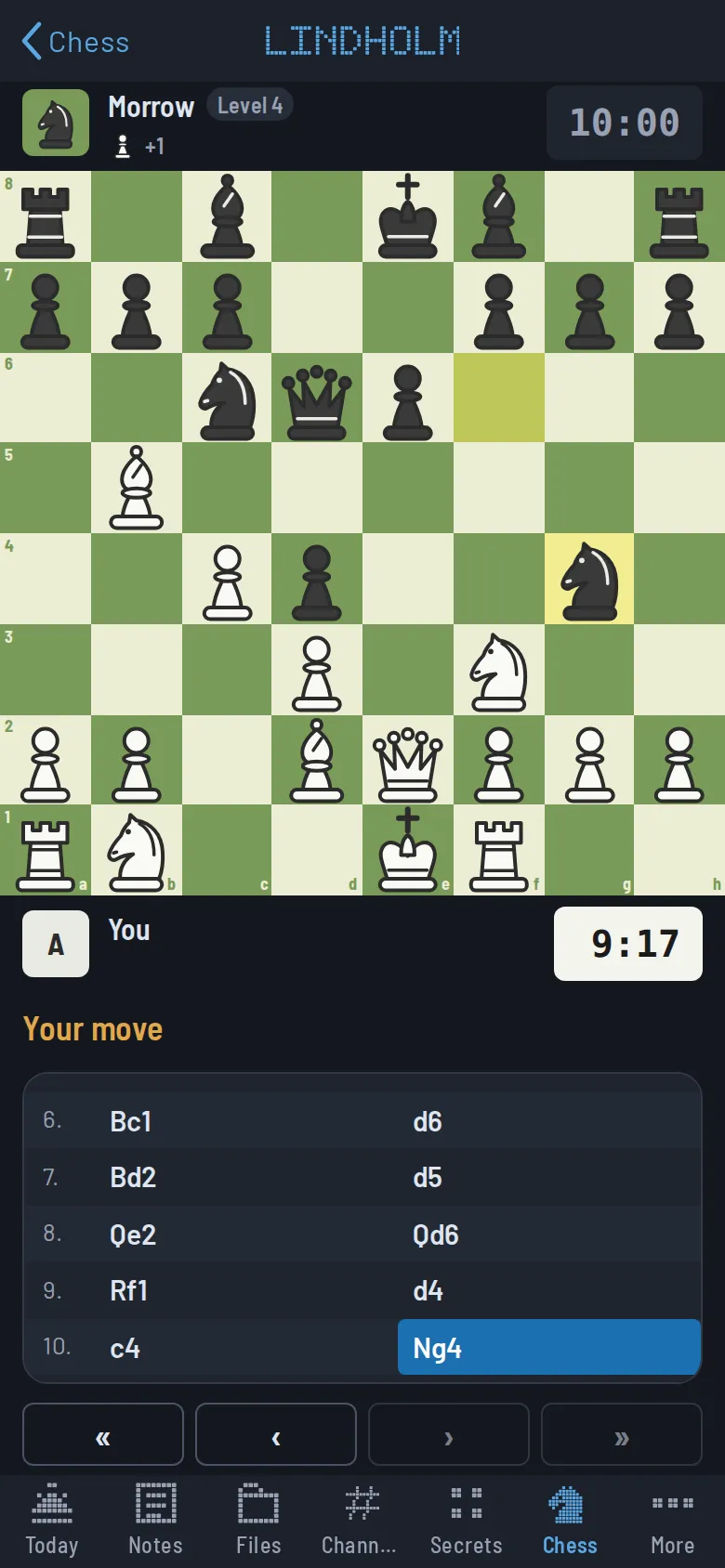
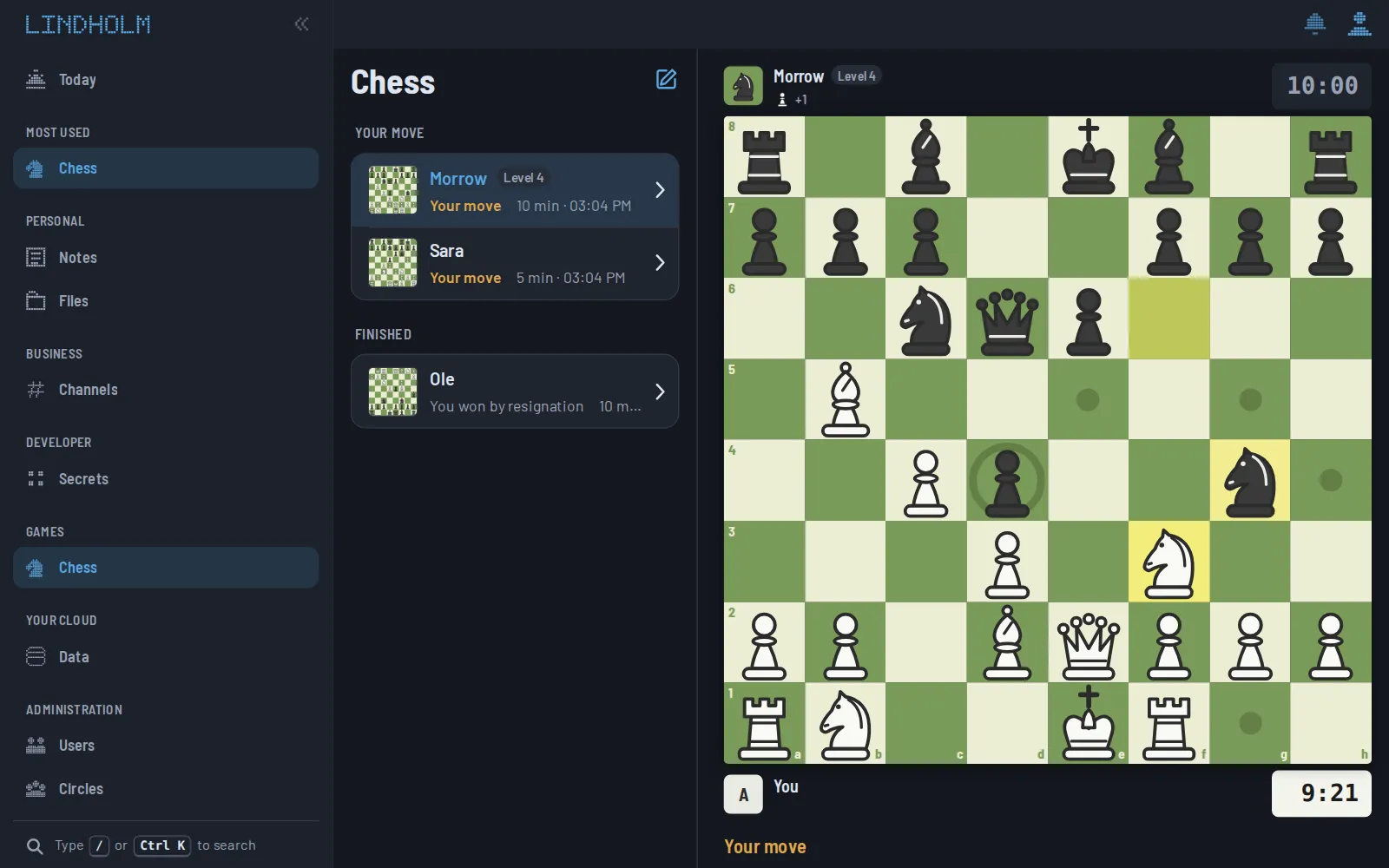
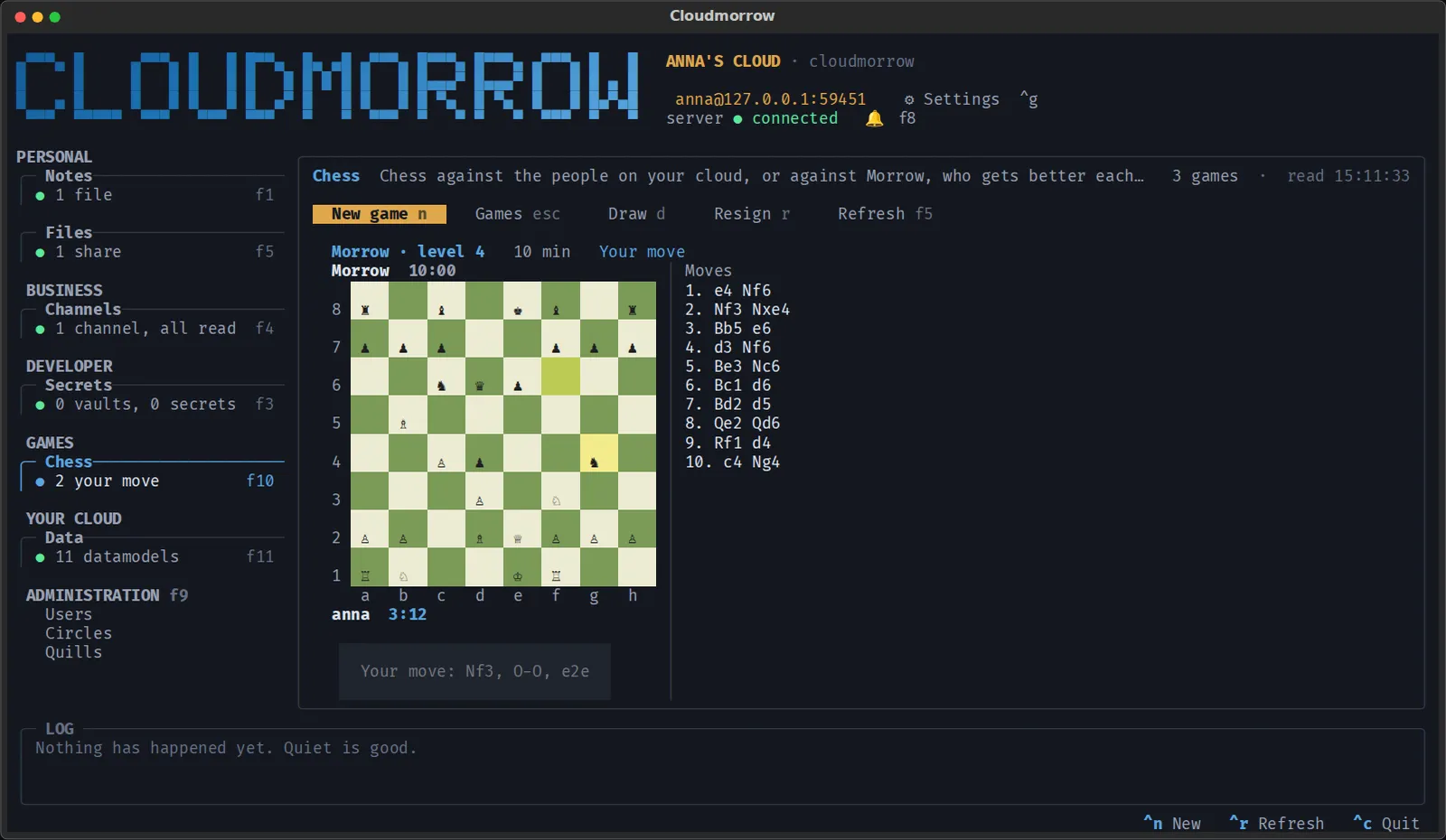
The games down the left, the open one's board in the middle, the clocks and the moves beside itin a browser, on a phone, in the terminal: the same screen, drawn by your cloud on each.
What it does
Play anybody on your cloud: pick them, pick the time, and the game is on their list with a push to tell them
Or play Morrow, who starts at level 1 and goes up a level each time you beat him, to level 10
No limit, 10 minutes or 5 minutes each, with a chess clock that runs on every screen the game is open on
A flat green board seen from above, the pieces moved by a tap or a drag, the moves you may make shown as dots
Every move checked by the rules before it is kept: castling, in passing, promotion, check, mate, stalemate, repetition and the fifty-move rule
Who has white is decided for you: the colours take turns from one game to the next, whoever starts it
Resign, offer a draw, and a rematch
Morrow takes his time over a move, as a person would, his clock running while he thinks
The sound of the pieces: a tap for a move, a knock for a capture, a bell with check
In the terminal and on the command line too: cm chess move <game> Nf3
Add it to your cloud
In your cloud, open Quills: Administration → Quills as an administrator, Me → Your Quills as anybody else. On its Catalog tab, Chess is on the Games shelf: open it and say yes. Its id, wherever your cloud asks for a quill by name:
id chess
Or on the command line, as an administrator for everyone, with --mine for yourself alone:
$ cm quill add chess
Either way your cloud shows you everything below and waits for your yes.
Standard. The installer offers Chess when you set up a new cloud, so you may have it already. How installing works
What it adds to your cloud
Datamodels
The kinds of data it works with. On a fresh cloud everyone can read and write what it brings the moment it is installed; the install sheet says so, and an administrator narrows it with circles. Records belong to the people who write them, not to the quill: removing it leaves every one where it is. What it adds — fields of its own, datamodels of its own — stays too, unless the administrator removing it chooses to drop them.
Introduces
Computer chess.computer
new, from Chess
Morrow, the computer you play, and the level he has reached against you.
Namenametext, one linerequiredEncrypted
Levellevelwhole numberEncrypted
Wonwonwhole numberEncrypted
Lostlostwhole numberEncrypted
Drawndrawnwhole numberEncrypted
Introduces
Game chess.game
new, from Chess
A game of chess between two people, or a person and Morrow.
Tabletablelink to Tablerequired · deleted with its tableIndexed
Namenametext, one linerequiredEncrypted
Whitewhitetext, one linerequiredIndexed
Blackblacktext, one linerequiredIndexed
MovesmovesJSONEncrypted
Computercomputertext, one lineEncrypted
Levellevelwhole numberEncrypted
Clockclockwhole numberEncrypted
White leftwhite_leftwhole numberEncrypted
Black leftblack_leftwhole numberEncrypted
Turn atturn_atdate and timeEncrypted
Answer atanswer_atdate and timeEncrypted
Resultresulttext, one lineIndexed
Reasonreasontext, one lineEncrypted
Drawdrawtext, one lineEncrypted
Introduces
Table chess.table
new, from Chess
Where the games between two people are, or one person's against the computer.
Namenametext, one linerequiredEncrypted
Kindkindone of People, ComputerIndexed
Indexed fields are kept plain, so your cloud can sort and filter by them. Encrypted fields are encrypted before they reach the disk.
Screens
ChessA chess of games. This kind of screen is drawn in a later release.
Each is a tab, drawn by your cloud itself on every surface:
Phonethe web app, made for the phone
Webthe full web app, in a browser
Terminalthe terminal app
Command linecm chess
Assistanttools for your assistant, as you
Comes with
A computer for each person, the first time they open Chess.morrow · “Morrow”
Its own code
Action startNew game; asks for opponent, clock
Action playPlay, on a game; asks for move
Its Python, quill.py, runs in a sandbox on your cloud, as whoever uses it, and reaches only what it declares. Your cloud shows all of this before you say yes; code on your own machine runs only once you switch it on there.
In its own words
Chess against the people on your cloud, or against Morrow, who gets better
each time you beat him — with no limit, ten minutes or five minutes each on
the clock.
A Quill
for Cloudmorrow: install it from the Quill Catalog, or from this repository
with cm quill add --source https://github.com/Cloudmorrow/quill-chess --ref v1.0.0.
It needs a Cloudmorrow server with the chess kit: v0.110.0 or later (v0.109.0 plays it, without Morrow taking his time).
(A throwaway cloud made for the pictures, named after nobody real.)
Play anybody on your cloud. The pen is a new game: pick who — any
person on the server, or Morrow — and how long. A game against a person
is on their list at once, with a push to tell them.
The colours take turns. Nobody picks white: the first game between
two people is a toss of a coin, and each one after has the colours the
other way round from the last — whoever of the two starts it. Against
Morrow the same.
Or play Morrow. He starts at level 1, where he looks one move ahead
and leaves pieces hanging, and goes up a level each time you beat him,
to level 10, where he looks five moves ahead and gives nothing away.
Losing or drawing leaves him where he is. Every person has their own
Morrow, at their own level. He takes his time over a move as a person
would — a few seconds, longer at the low levels, quicker in the opening
and in a five-minute game — with his clock running while he thinks.
A chess clock. No limit, 10 minutes or 5 minutes each. The clocks
start once both sides have moved, run on every screen the game is open
on, and the side whose time runs out loses — unless the other has
nothing left to mate with, when it is a draw.
A board you know. Flat, green and cream, seen from above, white at
the bottom unless you play black. Press a piece and where it may go is
dotted; press there, or drag it — put back where it stood, nothing
happens. The last move is lit, a king in check glows, a pawn at the end
asks what it becomes, and what each side has taken is drawn beside its
name.
The sound of it. A wooden tap for a move, a knock for a capture, a
bell with check, a chime at the end; the speaker beside the moves
switches it off.
The rules, all of them. Every move is checked before it is kept:
castling, taking in passing, promotion, check and mate, stalemate, a
position three times over, the fifty-move rule, and too little left to
mate with.
Resign, a draw, a rematch. Offer a draw and the other side can take
it or turn it down; Morrow takes one only when he stands worse. Once it
is over, Rematch plays the same person again, the colours taking their
turn.
Using it
In the web app
The Chess tab: your games, those where it is your move first, then the
ones waiting on the other player, then the finished ones, each with a
small picture of its board. On a computer the open game is beside the
list: the board in the middle, the other player and their clock above it,
you and yours below, the moves and the buttons on the right. On a phone,
the game is a page of its own, the board from edge to edge. The arrows
under the moves look back through the game; any press on the board brings
you back to now.
In the terminal app
The Chess card: the games, then one game's board in text with the
clocks and the moves beside it. Type a move — e4, Nf3, O-O, e8=Q —
and Enter. n starts a new game, d offers or takes a draw, r resigns.
On the command line
cm chess list                         # your games, and where each stands
cm chess new Morrow --clock 10m
cm chess new sara --clock 5m          # a person, by their username
cm chess show <game>                  # the board, the clocks, the moves
cm chess move <game> Nf3              # or g1f3
cm chess draw <game>                  # offer one, or take the one offered
cm chess resign <game>
A game is named by the start of its id, as list prints it, or its name.
How it works
A game between two people is kept at their table: a space shared by
exactly the two of them, found from either side, so nobody else on the
server sees their games. Games against Morrow are at your own table, which
is yours alone. A game keeps the moves played, what each side had left on
the clock after its last move, and since when the side to move has been
thinking; the board, the clocks and the moves are worked out from those on
every screen by the core's chess kit.
Every move goes through the Quill's code, which checks it by the rules
(the core's cloudmorrow.quill.chess), takes the time spent off the
mover's clock, notices the end of the game, and, against Morrow, has him
answer — kept back until answer_at, the few seconds he takes over it,
so every screen shows him thinking meanwhile. Morrow (morrow.py) looks ahead with alpha-beta search,
follows captures to the end, and weighs what he sees by the pieces and
where they stand; his level sets how far he looks and how loosely he
plays. He runs in the sandbox, so how long he thinks is counted in
positions looked at, never more than a second or two.
What it adds to your Cloudmorrow
cm quill check prints this for you; it is here for the catalog page.
Datamodels
introduces chess.table (a space: the two people a game is between, or your own against Morrow), chess.game and chess.computer (Morrow, and his level against you)
Screens
Chess, a chess board, on the phone, the web app, the terminal, cm chess, and to your assistant
Actions
New game; Play (a move, resign, a draw, a fallen flag)
Code
quill.py and morrow.py, in the sandbox, as whoever uses it; reaches nothing outside
Working on it
uv sync                  # .venv with Cloudmorrow and pytest
cm quill check           # the manifest, as a server would install it
cm quill test            # tests/, against the real record store and gate
cm quill test --sandbox  # the same, with quill.py in the sandbox
cm quill dev --local     # a throwaway server here, reinstalled as you save
The pictures in screenshots/ (<screen>-desktop.webp 1600×1000,
<screen>-phone.webp 780×1688, <screen>-tui.webp 1600×930, captioned in
quill.toml's [[screenshots]]) are taken from a throwaway cloud named
after nobody real, never from anybody's own cloud. Retake them when the
screen changes.